
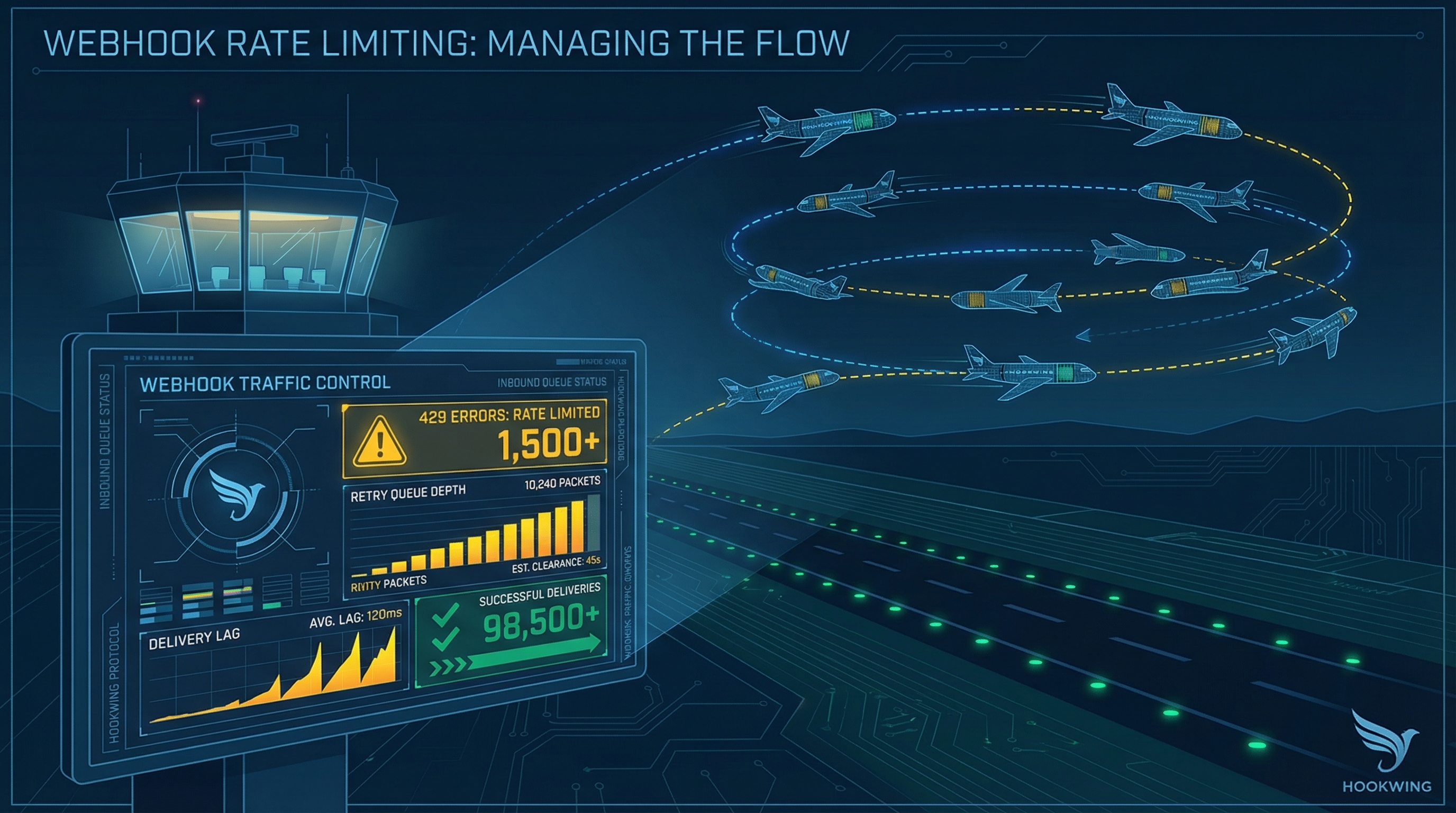
In short
- Rate limiting hits you from both sides: as a sender you get throttled, as a receiver you get overwhelmed
- When you hit a 429, use exponential backoff with jitter — never retry immediately
- Read
Retry-Afterheaders; if missing, calculate your own wait window - On the receiver side, accept fast and process slower — a queue between ingestion and processing absorbs burst spikes
---
1. The two sides of webhook rate limiting
Most developers think about rate limits from one angle: "I'm getting 429s from Stripe, what do I do?" That's the sender perspective — you're delivering webhooks to a third-party endpoint that can't keep up with your traffic.
But there's a second problem that gets less attention. When you're on the receiving end — accepting webhooks from GitHub, Stripe, or any other provider — your endpoint can get hammered by a burst of retries after an outage. That burst is your rate limit problem to solve.
The two problems look different, but the underlying principle is the same: match delivery speed to processing capacity.
---
2. What HTTP 429 actually tells you
A 429 response means "too many requests — slow down." The useful part is in the headers:
HTTP/1.1 429 Too Many Requests
Retry-After: 30
X-RateLimit-Limit: 100
X-RateLimit-Remaining: 0
X-RateLimit-Reset: 1711020000
Retry-After gives you a concrete wait time in seconds (or an HTTP date). X-RateLimit-Reset tells you when the window resets. X-RateLimit-Remaining tells you how many requests you have left in the current window.
Not every provider sends all three. Stripe includes Retry-After. GitHub uses X-RateLimit-* headers. Some APIs return rate limit info only in the response body. Read the docs for any provider you integrate with — and build your retry logic to handle missing headers gracefully.
---
3. Exponential backoff and jitter
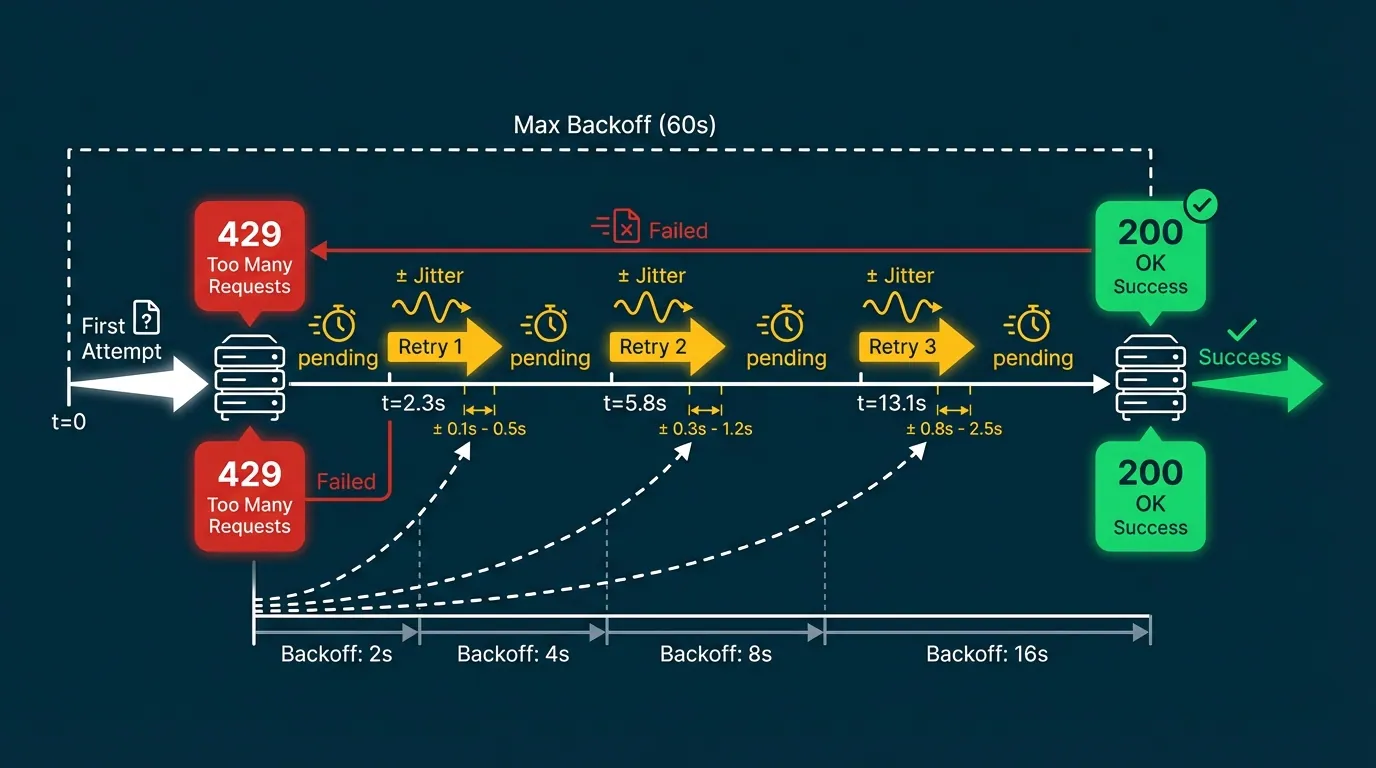
When you hit a 429 (or a 5xx timeout), the wrong move is retrying immediately. If your service and ten others all retry at the same second, you recreate the spike that caused the problem — the thundering herd.
Exponential backoff spreads retries out over time:
wait = base * 2^attemptWith a base of 1 second: attempt 1 waits 2s, attempt 2 waits 4s, attempt 3 waits 8s, and so on.
Jitter adds a random offset so retries from multiple workers don't align:
function backoffMs(attempt, baseMs = 1000, capMs = 60000) {
  const exp = Math.min(capMs, baseMs * Math.pow(2, attempt));
  return exp / 2 + Math.random() * (exp / 2);
}
The cap matters. Without one, a long outage produces absurdly long waits (attempt 10 = 1024 seconds). Cap at 60 seconds or whatever your SLA allows, then keep retrying at that interval until the event succeeds or lands in your dead letter queue.
---
4. Respecting Retry-After headers
If a provider sends a Retry-After header, use it. It's more accurate than your own backoff calculation — the provider knows exactly when its rate window resets.
async function sendWithRetry(url, payload, maxAttempts = 5) {
  for (let attempt = 0; attempt < maxAttempts; attempt++) {
    const res = await fetch(url, {
      method: 'POST',
      body: JSON.stringify(payload),
      headers: { 'Content-Type': 'application/json' },
    });

    if (res.ok) return res;

    if (res.status === 429) {
      const retryAfter = res.headers.get('Retry-After');
      const waitMs = retryAfter
        ? parseInt(retryAfter, 10) * 1000
        : backoffMs(attempt);
      await sleep(waitMs);
      continue;
    }

    // Non-retryable error
    throw new Error(`Delivery failed: ${res.status}`);
  }

  throw new Error('Max retry attempts reached');
}
Two notes on Retry-After: it can be a number of seconds or an HTTP-date string (Fri, 20 Mar 2026 18:00:00 GMT). Parse accordingly. And if the header is absent, fall back to your own backoff — don't assume you can retry immediately.
---
5. When you're the receiver: protecting your endpoint
Here's the scenario: a provider has an outage for 20 minutes. During that time, 4,000 events queue up on their side. When they recover, they fire all 4,000 at you within a few seconds. Your endpoint, which normally handles 50 requests per second, falls over.
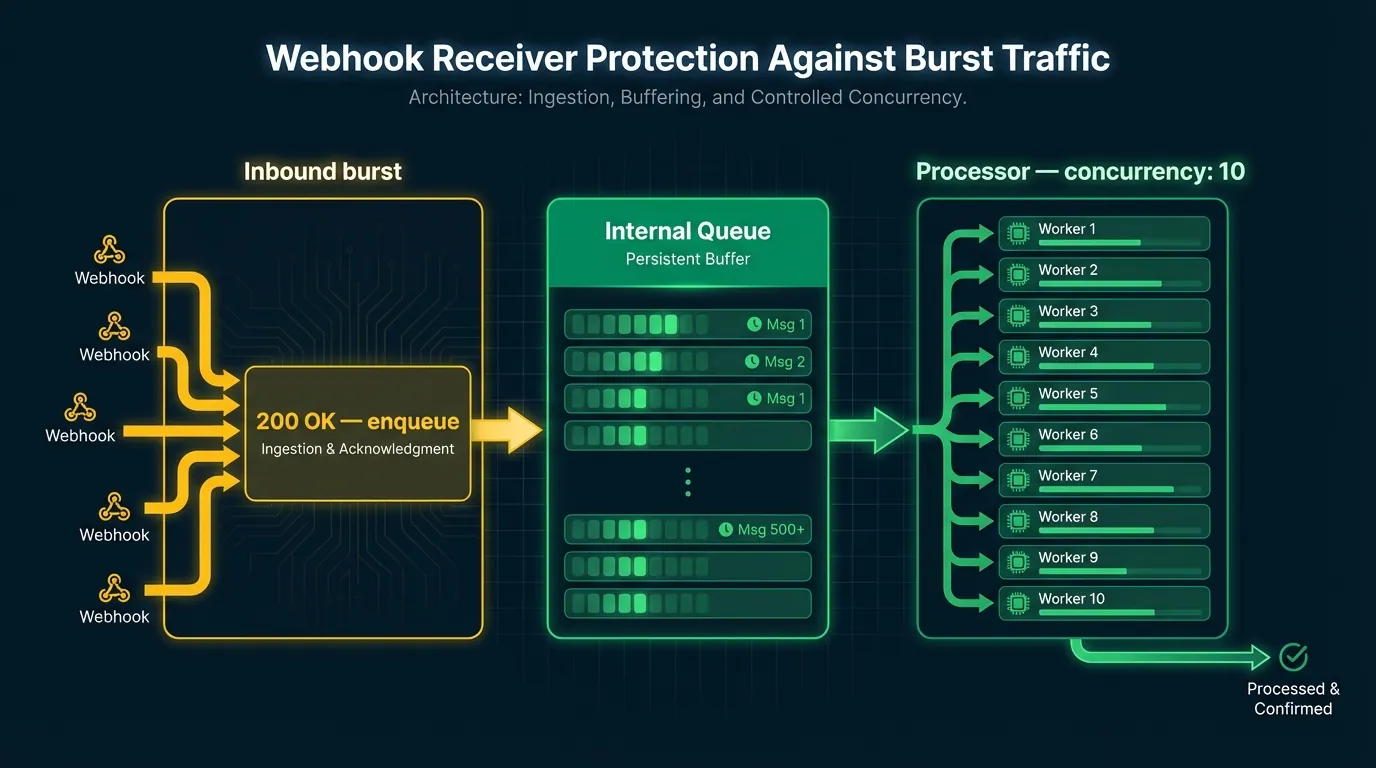
The solution is accepting fast, processing slower. Your ingestion layer acknowledges the webhook immediately (returns 200), then drops the event into an internal queue. A separate worker drains the queue at a rate your system can handle.
Inbound burst → ingestion (200 OK, enqueue) → queue → worker (concurrency: 10)This decouples delivery acknowledgment from processing. Providers see successful delivery. You process at a safe rate. No events are lost.
Concurrency limits at the worker level are the other half. Set a maximum number of concurrent processing jobs — 10, 20, whatever your downstream can handle — and let the queue absorb the rest.
If you're using Hookwing, this pattern is built in. Hookwing's ingestion layer accepts and queues events immediately, with configurable concurrency limits on delivery to your processing endpoint. You don't implement the queue — you configure the drain rate.
---
6. Monitoring rate limits in production
Rate limit events are worth tracking explicitly. The metrics that matter:
- 429 rate — what percentage of outbound deliveries are hitting rate limits
- Retry queue depth — how many events are waiting to be retried
- Delivery lag — time between event creation and successful delivery
- Backoff window — are retries honoring the
Retry-Afterwindow or firing early
Alert on sustained 429s (more than X% of deliveries over a 5-minute window) and on queue depth growing beyond a threshold. A growing queue without a corresponding spike in inbound traffic usually means a downstream endpoint is struggling — worth investigating before it becomes a full outage.
For a deeper look at the full observability picture, the webhook monitoring guide covers log structure, dashboards, and alert thresholds end to end.
---
Conclusion
Rate limits aren't failures — they're signals. A 429 means the system is protecting itself; your job is to listen and adapt. As a sender, build backoff and jitter in from the start, read Retry-After headers, and cap your retry intervals. As a receiver, accept fast and queue for later — don't let a burst of retries take down your endpoint.
The webhook retry guide covers the broader reliability stack if you want to go deeper on retry logic, idempotency, and failure recovery.
---
Build reliable webhooks with Hookwing Hookwing helps you receive, route, retry, and monitor webhook events with clear delivery visibility and production-safe recovery workflows. Start free and ship faster with confidence.